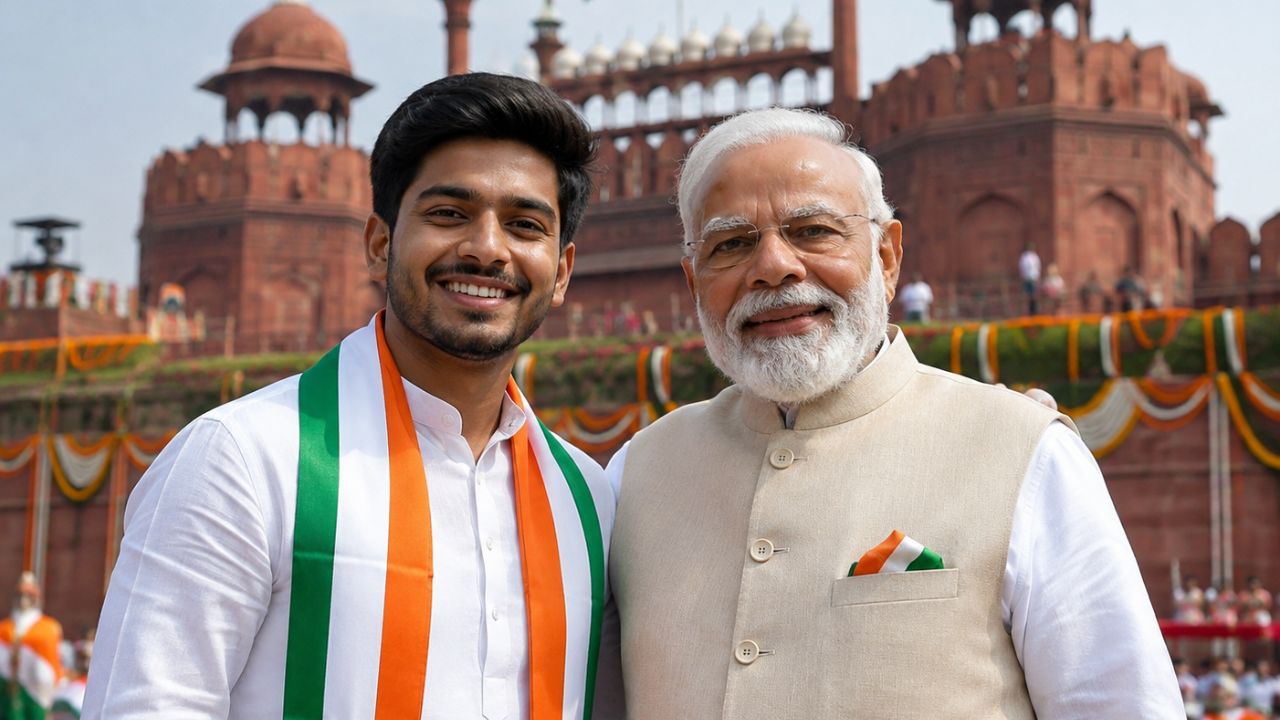
नई दिल्ली: 15 अगस्त यानी स्वतंत्रता दिवस पर WhatsApp स्टेटस और Instagram स्टोरी को खास बनाने के लिए लोग अलग-अलग तरीके आजमाते हैं. अगर इस बार आप अपनी ऐसी फोटो लगाना चाहते हैं जो आम तस्वीरों से बिल्कुल अलग दिखे, तो AI की मदद ली जा सकती है. Google Gemini के इमेज जनरेशन फीचर के जरिए आप अपनी फोटो को स्वतंत्रता दिवस की थीम में तैयार कर सकते हैं और उसमें प्रधानमंत्री नरेंद्र मोदी के साथ एक फोटो जैसा विजुअल भी बना सकते हैं.
इसके लिए आपको किसी फोटो एडिटिंग सॉफ्टवेयर की जरूरत नहीं पड़ेगी. बस अपने फोन में Gemini ऐप खोलें, अपनी फोटो अपलोड करें और नीचे दिए गए प्रॉम्प्ट में से किसी एक को कॉपी करके पेस्ट कर दें. कुछ ही समय में AI आपके लिए स्वतंत्रता दिवस की थीम वाली तस्वीर तैयार कर सकता है.
कैसे बनाएं Gemini पर PM मोदी संग स्वतंत्रता दिवस वाला स्टेटस?
सबसे पहले अपने स्मार्टफोन में Gemini ऐप खोलें. अगर ऐप फोन में मौजूद नहीं है, तो इसे संबंधित ऐप स्टोर से डाउनलोड किया जा सकता है. एंड्रॉयड के कुछ नए फोन में यह पहले से उपलब्ध हो सकता है. इसके बाद Gemini में दिए गए ‘+’ आइकन पर टैप करें और Images विकल्प चुनें. अब दोबारा ‘+’ पर जाकर Photos विकल्प चुनें और अपनी गैलरी से वह तस्वीर अपलोड करें जिसे आप एडिट या जनरेट की जाने वाली फोटो में इस्तेमाल करना चाहते हैं.
जरूरत हो तो Camera विकल्प के जरिए उसी समय फोटो भी क्लिक की जा सकती है. अब अपनी पसंद का प्रॉम्प्ट कॉपी करके Gemini के चैट बॉक्स में पेस्ट करें. इसके बाद भेजने वाले तीर के निशान पर टैप करें. Gemini आपके निर्देशों के आधार पर स्वतंत्रता दिवस की थीम वाली तस्वीर तैयार करेगा.
PM मोदी के साथ फोटो के लिए Prompt 1
Create a hyper-realistic, high-resolution portrait of a young Indian [man/woman] dressed in traditional white Kurta-Pajama with a tricolor Nehru jacket, standing respectfully beside Prime Minister Narendra Modi. The background features the historic Red Fort in Delhi decorated with Indian flags and flowers under a bright blue sky. Use soft, natural cinematic lighting, realistic facial details, lifelike textures and a professional photography look.
स्वतंत्रता दिवस स्टेटस के लिए Prompt 2
Create a realistic full-body photograph of an Indian [boy/girl] standing alongside Prime Minister Narendra Modi. Both are respectfully holding a neatly unfolded Indian national flag together. Create a joyful Independence Day atmosphere with subtle tricolor decorations and light confetti in the background. Use natural expressions, lifelike details, realistic textures, balanced lighting and a high-quality professional photography style.
Candid Photo के लिए Prompt 3
Create a realistic, high-definition candid photograph showing Prime Minister Narendra Modi having a warm and inspiring interaction with a young Indian [man/woman] wearing elegant modern ethnic clothing. The background has subtle tricolor lighting and Independence Day decorations. Use natural expressions, realistic skin texture, soft lighting, depth of field and the appearance of professional portrait photography.
Red Fort वाली Cinematic Photo के लिए Prompt 4
Create a highly realistic cinematic photograph during golden hour at the historic Red Fort in Delhi. Prime Minister Narendra Modi is standing near the ramparts, wearing a white kurta-pajama and a traditional Nehru jacket with a small Indian flag pin. He is smiling warmly while looking toward the Indian national flag fluttering in the wind. Standing respectfully nearby is a young Indian man or woman in their early 20s, wearing a tricolor scarf and holding a small Indian flag. The Red Fort is decorated with marigold flowers and subtle tricolor lighting. The sky has warm orange and soft blue tones. Use natural diffused lighting, realistic facial details, lifelike textures, cinematic depth of field and professional photography quality.
फोटो बनाते समय इन बातों का रखें ध्यान
AI से फोटो बनाते समय अपनी ऐसी तस्वीर इस्तेमाल करें जिसमें चेहरा साफ दिखाई दे. अगर आप चाहते हैं कि तैयार तस्वीर ज्यादा प्राकृतिक लगे, तो प्रॉम्प्ट में realistic, natural expressions, lifelike textures जैसे शब्द शामिल कर सकते हैं. कपड़े, बैकग्राउंड, रोशनी और फोटो का मूड भी प्रॉम्प्ट में साफ लिखना बेहतर परिणाम देने में मदद कर सकता है. हालांकि AI से बनाई गई तस्वीर वास्तविक घटना की फोटो नहीं होती. इसलिए ऐसी तस्वीर को सोशल मीडिया पर शेयर करते समय यह स्पष्ट रखना बेहतर है कि यह AI-generated image है. इससे देखने वाले को तस्वीर की वास्तविकता को लेकर गलतफहमी नहीं होगी.